
Work Health and Safety (WHS) in the Digital Domain
Posted by SkillMaker in Mar, 2025
Use computer systems in the printing and graphic arts sectors
What is a concise description of WHS procedures in relation to using computer systems in the printing and graphic arts sectors?

Work Health and Safety (WHS) procedures related to computer systems in the printing and graphic arts sectors involve a set of guidelines and practices aimed at ensuring a safe working environment when using digital tools. This includes ergonomics, proper equipment handling, and maintaining physical and mental well-being in the workplace.
Listen to this article as a podcast
Why do people in the Printing and Graphics industry need WHS procedures for using computer systems?
The adoption of WHS procedures when using computer systems is essential for preventing workplace injuries such as repetitive strain injuries, eye strain, and mental fatigue. These procedures ensure employees operate in safe environments, thereby reducing downtime caused by health issues and increasing productivity. Moreover, they promote compliance with legal safety regulations.
“WHS procedures are vital for maintaining a safe and productive workplace, ensuring employee well-being while using computer systems.”
What are the key components or elements of WHS procedures for using computer systems in the Printing and Graphics industry?
Key components include:
- Ergonomic Setup: Adjusting workstations to prevent physical strain.
- Regular Breaks: Scheduling intervals to reduce eye fatigue and stress.
- Training: Educating staff on safe computer usage and posture.
- Ventilation: Ensuring a well-ventilated workspace to avoid overheating of devices.
- Security Measures: Protecting data and equipment from cyber threats.
What key terms, with descriptions, relate to WHS procedures in using computer systems?

Registered Trademark®
- Ergonomics: Study of people’s efficiency in their working environment.
- Repetitive Strain Injury (RSI): Pain caused by repetitive movement and overuse.
- Cybersecurity: Measures taken to protect a computer system against unauthorized access or attack.
- Screen Glare: Brightness that can cause eye strain and headaches.
- Workplace Safety Regulations: Legal requirements ensuring the safety and health of employees at work.
Who is typically engaged with implementing WHS procedures in computer system usage?
Typically, WHS officers, IT managers, and department heads are responsible for implementing these procedures. Employees, too, play a critical role in maintaining their personal safety by adhering to set guidelines and reporting any hazards or non-compliance.
How does WHS procedures integrate with other components of the Printing and Graphics industry in Australia?
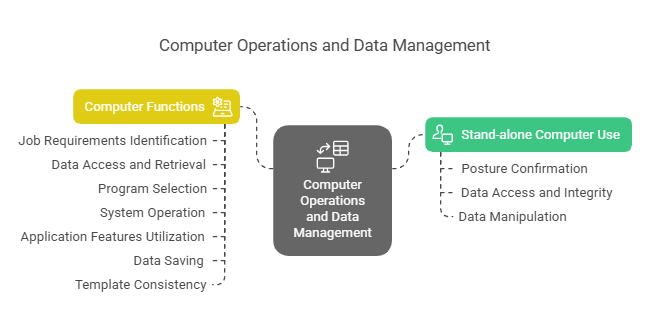
WHS procedures are integral to the broader safety and operational protocols within the Printing and Graphics industry. These practices complement physical safety measures in production areas, support overall workplace wellness programs, and ensure compliance with industry standards for safe working conditions.
Where can the student go to find out more information about WHS procedures when using computer systems?
What job roles would be knowledgeable about WHS procedures in using computer systems?
Roles include:
- WHS Officers
- IT Managers
- Graphic Designers
- System Administrators
- Occupational Health and Safety Trainers
What are WHS procedures for computer usage like in relation to sports, family, or schools?

In sports, WHS procedures for computer use are like the rigorous training and form-checking that athletes undertake to prevent injury. In families, they’re akin to setting rules and routines for safe and harmonious living. In schools, they reflect the emphasis on structured, safe learning environments that support children’s growth without harm.
(The first edition of this post was generated by AI to provide affordable education and insights to a learner-hungry world. The author will edit, endorse, and update it with additional rich learning content.)
(Skillmaker – 2025)
- About the Author
- More info

Workskill training for all

 Post Tagged with