
Optimising Computer Functions in the Printing and Graphic Arts Sectors
Posted by SkillMaker in Mar, 2025
What is a concise description of optimising computer functions in the printing and graphic arts sectors?

Optimising computer functions in the printing and graphic arts sectors involves efficiently utilising software and hardware to enhance the quality, speed, and efficiency of design, pre-press work, and printing processes. This optimises workflows and maximises output quality while reducing waste and costs.
Listen to this article as a podcast
Why do people in the Printing and Graphics industry need optimising computer functions?
In the highly competitive Printing and Graphics industry, optimising computer functions ensures productivity and quality. It enables professionals to work faster and more efficiently, streamlining the design-to-print process. This improvement not only meets client expectations but also ensures profitability by reducing wastage and errors.
“Optimising computer functions in the printing and graphics sectors is crucial for maintaining efficiency and quality, ensuring timely delivery of superior products.”
What are the key components or elements of optimising computer functions?
Key components of optimising computer functions include:
- Software Management: Utilising the latest, appropriate software tools for design and printing tasks.
- Hardware Upkeep: Ensuring all equipment is up-to-date and properly maintained.
- Workflow Automation: Integrating automated processes to reduce manual tasks.
- Data Management: Organising and optimising file storage for easy access and use.
- Training: Providing staff with ongoing training to keep skills current.
What key terms, with descriptions, relate to optimising computer functions?

Registered Trademark®
- RIP (Raster Image Processor): Software that converts images into printable data.
- Workflow Management: Coordination and control of the sequence of processes in printing.
- Pre-Press: Preparing digital files for print.
- Calibration: Adjusting equipment to ensure accurate reproduction of designs.
- Variable Data Printing (VDP): Customising print output based on information from a database.
Who is typically engaged with operating or implementing optimised computer functions?
Graphic designers, pre-press technicians, IT specialists, and print production managers are usually involved in operating or implementing optimised computer functions within this sector. Their collaborative role is crucial in maintaining efficiency and quality across the entire printing workflow.
How does optimising computer functions align or integrate with other components of the Printing and Graphics industry in Australia?
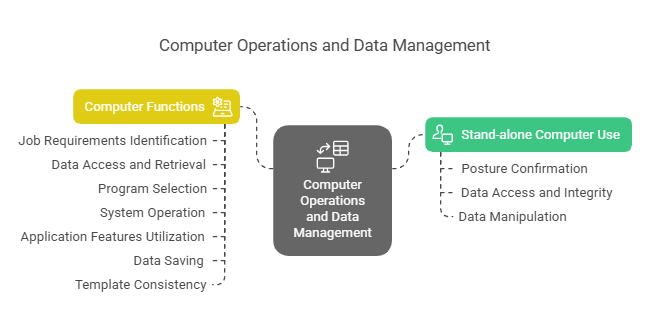
Optimising computer functions seamlessly integrates with automation, sustainability efforts, and innovative design techniques, thereby enhancing the creative and operational aspects of the Printing and Graphics industry. This alignment supports continuous improvement and innovation in Australian print operations.
Where can the student go to find out more information about optimising computer functions in the Printing and Graphics sectors?
What job roles would be knowledgeable about optimising computer functions in the Printing and Graphics sectors?
Roles include:
- Graphic Designers
- Pre-Press Technicians
- IT Specialists
- Print Production Managers
- Workflow Coordinators
What is optimising computer functions like in relation to sports, family, or schools?

In sports, optimising computer functions is similar to a team using advanced technology and analytics for improved performance. In a family setting, it resembles organising household tools to ensure chores are done quickly and efficiently. As for schools, it reflects implementing the latest educational software to enhance teaching methods and learning experiences.
(The first edition of this post was generated by AI to provide affordable education and insights to a learner-hungry world. The author will edit, endorse, and update it with additional rich learning content.)
(Skillmaker – 2025)- About the Author
- More info

Workskill training for all

 Post Tagged with