
Accessing Data in Computer Systems for the Printing and Graphic Arts Sector
Posted by SkillMaker in Mar, 2025
What is a concise description of accessing data in computer systems for the Printing and Graphic Arts sector?

Accessing data in computer systems for the printing and graphic arts sectors involves utilising software and technological tools to retrieve, store, and manage digital information crucial in design, layout processes, and print production. Ensuring secure and efficient data access is fundamental to maintaining workflow continuity and productivity.
Listen to this article as a podcast
Why is accessing data in computer systems essential for people in the Printing and Graphics industry?
Accessing data is fundamental for professionals in the printing and graphics industry as it enables the seamless transition from design to production. Efficient data retrieval ensures continuity in production processes, reduces downtime, and enhances the accuracy and quality of the final product. It also supports effective communication across teams and contributes to a streamlined workflow.
“Data access in printing and graphics is the backbone of modern production, fostering creativity, precision, and collaboration to deliver outstanding results.”
What are the key components or elements of accessing data in computer systems for the Printing and Graphic Arts sector?
Key components of accessing data in this context include:
- Data Management Software: Systems used for storing and retrieving digital files.
- Security Protocols: Measures to protect data integrity and prevent unauthorized access.
- Network Connectivity: Reliable network infrastructure for steady data flow and communication.
- User Access Controls: Managing permissions to ensure only authorized personnel access specific data.
- Data Backup Solutions: Systems to ensure data is safely stored and recoverable in case of loss.
What key terms, with descriptions, relate to accessing data in computer systems for the Printing and Graphic Arts sector?

Registered Trademark®
- Cloud Storage: Online platforms for storing data accessible via the internet.
- Encryption: Converting data into a secure format to protect information.
- File Transfer Protocol (FTP): A standard network protocol used to transfer files from one host to another over the internet.
- Cybersecurity: Measures to protect systems and data from cyber threats.
- Database Management System (DBMS): Software for creating and managing databases.
Who is typically engaged with operating or implementing data access in computer systems for the Printing and Graphic Arts sector?
Graphic designers, IT administrators, print production managers, and data analysts are typically involved in operating and implementing data access in computer systems. These roles ensure that digital assets are efficiently managed, secure, and accessible to relevant team members.
How does accessing data in computer systems align or integrate with other components of the Printing and Graphic Arts industry in Australia?
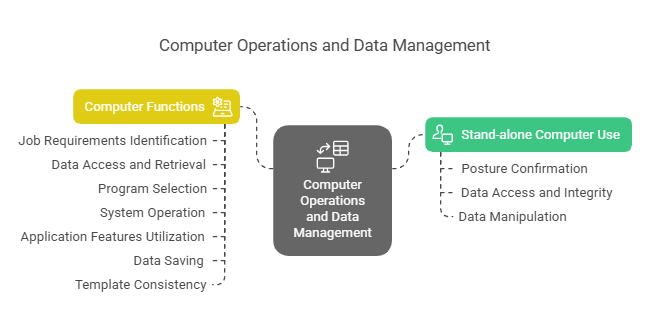
Data access is integral to various components, from the initial design concept to the final print production. It aligns with the need for high-quality digital files, efficient workflow management, and adherence to strict timelines. In the Printing and Graphic Arts industry in Australia, accessing data harmonizes with technological advancement, eco-friendly practices, and standards compliance, thus supporting a competitive edge.
Where can the student go to find out more information about accessing data in the Printing and Graphic Arts sector?
What job roles would be knowledgeable about accessing data in computer systems for the Printing and Graphic Arts sector?
Roles include:
- IT Administrators
- Graphic Designers
- Print Production Managers
- Data Analysts
- Network Engineers
What is accessing data in computer systems for the Printing and Graphic Arts sector like in relation to sports, family, or schools?

Accessing data in this sector is comparable to a sports team having access to playbooks and statistics for strategy formation, a family managing schedules and budgets for household efficiency, or a school deploying a learning management system that aligns educational resources and tracks student progress. In each scenario, having timely and accurate access to information is key to achieving successful outcomes.
(The first edition of this post was generated by AI to provide affordable education and insights to a learner-hungry world. The author will edit, endorse, and update it with additional rich learning content.)
(Skillmaker – 2025)- About the Author
- More info

Workskill training for all

 Post Tagged with