
Maximising Efficiency: Navigating Software in the Printing and Graphic Arts Sectors
Posted by Payel Chandra Das in Mar, 2025
What is a concise description of selecting the right program when using computer systems in the printing and graphic arts sectors?

Selecting the right program in the printing and graphic arts sectors involves choosing software that enhances productivity and creativity. This process includes assessing the specific needs of a project, understanding software capabilities, and aligning these with industry standards to ensure high-quality outputs.
Listen to this article as a podcast
Why do people in the Printing and Graphics industry need to select appropriate software?
Choosing the right software is crucial as it directly impacts workflow efficiency, quality of the final product, and cost-effectiveness. In the printing and graphics industry, where precision and creativity are paramount, the appropriate software facilitates innovative design, seamless process integration, and compliance with industry standards, ultimately enhancing competitive advantage.
“The right software can unlock a world of possibilities in printing and graphic arts, pushing the boundaries of creativity and efficiency to new heights.”
What are the key components or elements of selecting the right software?
Key components of selecting the right software include:
- Project Requirements: Thorough understanding of the project’s needs.
- Software Capability: Evaluation of features and tools that meet demands.
- Compatibility: Ability to integrate with existing systems and technologies.
- User-Friendliness: Ease of use and accessibility for all team members.
- Cost and Support: Consideration of pricing, updates, and customer support.
What key terms, with descriptions, relate to software selection in the industry?

Registered Trademark®
- Vector Graphics: Images created from geometric formulas, ideal for scalability without loss of quality.
- Raster Graphics: Pixel-based images that allow for intricate detail but may lose clarity when resized.
- Cross-Platform: Software that can operate on different operating systems seamlessly.
- Cloud-Based Solutions: Programs accessible through the internet, promoting collaboration and flexibility.
- 3D Modeling: Digital sculpting or production of three-dimensional objects.
Who is typically engaged with operating or implementing this software selection?
Graphic designers, IT specialists, project managers, and procurement officers are typically involved in the selection and implementation of software in the printing and graphic arts sectors. Their combined expertise ensures the software meets both creative and technical needs, supporting efficient project execution.
How does software selection align or integrate with other components of the Printing and Graphics industry in Australia?
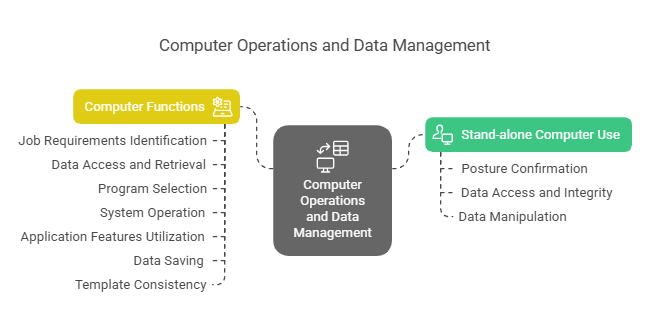
Software selection is integral to the industry, as it supports the entire design-to-production workflow. It aligns with quality control, data management, and digital printing technologies, ensuring that each process step maintains alignment with industry standards and client expectations.
Where can the student go to find out more information about software selection?
What job roles would be knowledgeable about software selection?
Roles include:
- Graphic Designers
- IT Specialists
- Project Managers
- Procurement Officers
- Prepress Technicians
What is software selection like in relation to sports, family or schools?

In sport, selecting the right software is like choosing the best gear to enhance performance. For families, it’s akin to picking the right kitchen tools to make cooking efficient and enjoyable. In schools, it resembles the choice of textbooks that best support the curriculum and learning styles of students.
(The first edition of this post was generated by AI to provide affordable education and insights to a learner-hungry world. The author will edit, endorse, and update it with additional rich learning content.)
(Skillmaker – 2025)
 Post Tagged with