
Accessing, Saving, and Retrieving Data in Printing and Graphic Arts
Posted by SkillMaker in Mar, 2025
What is a concise description of accessing, saving, and retrieving data in the printing and graphic arts sectors?

Accessing, saving, and retrieving data in the printing and graphic arts sectors involves managing digital files effectively to streamline production processes. This includes using computer systems to organize, store, and retrieve essential documents and graphics, ensuring that information is readily available for use in design and printing tasks.
Listen to this article as a podcast
Why do people in the Printing and Graphics industry need to access, save, and retrieve data?
Professionals in the printing and graphics industry need to efficiently access, save, and retrieve data to ensure smooth workflow and high-quality output. Managing data effectively helps reduce production delays, enhance collaboration, maintain the integrity of design files, and ensure accuracy in the final printed product.
“Efficient data management in printing and graphics enhances workflow, maintains design integrity, and ensures timely, accurate output.”
What are the key components or elements of accessing, saving, and retrieving data in Printing and Graphics?
Key components include:
- File Organization: Structured storage of files to find and retrieve easily.
- Data Security: Protecting files from unauthorized access or loss.
- Backup Systems: Regularly saving data to prevent loss from system failures.
- Software Tools: Using applications that support efficient file management and retrieval.
- Version Control: Managing different iterations of files to ensure accuracy and consistency.
What key terms, with descriptions, relate to accessing, saving, and retrieving data in Printing and Graphics?

Registered Trademark®
- Data Management: The practice of organizing and maintaining data processes.
- Cloud Storage: Online data storage that provides remote access and backup.
- Metadata: Information about data that helps in organizing and retrieving files.
- Network Drive: Shared storage space accessible by multiple users within the same network.
- Encryption: A method of securing data by converting it into a coded format.
Who is typically engaged with operating or implementing data access, saving, and retrieval in Printing and Graphics?
Graphic designers, production managers, prepress operators, and IT specialists typically handle data management tasks within the printing and graphics industry. These roles ensure that data is efficiently stored, accessed, and used in design and production processes.
How does data management align or integrate with other components of the Printing and Graphics industry in Australia?
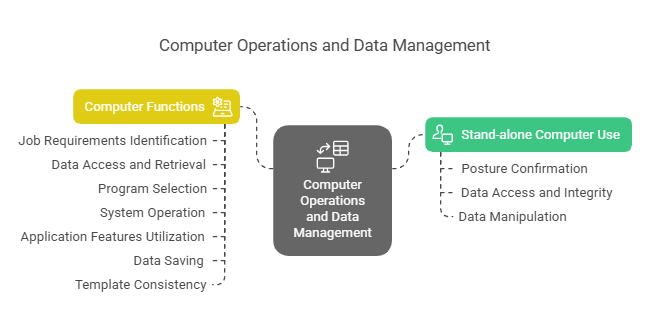
Data management within the printing and graphics industry integrates seamlessly with production workflows by coordinating digital assets across design, prepress, and printing stages. It supports efficient collaboration, customization, and quick turnaround times, which are crucial in meeting client expectations and industry standards.
Where can the student go to find out more information about data management in Printing and Graphics?
What job roles would be knowledgeable about data management in Printing and Graphics?
Roles include:
- Graphic Designers
- Print Production Managers
- Prepress Operators
- IT Specialists
- Data Analysts
What is data management in Printing and Graphics like in relation to sports, family, or schools?

Data management in the printing and graphics industry is like organising a sports team by systematically planning and executing plays. It resembles family management by having a structured environment where information is easily accessed and used efficiently. In schools, it’s akin to managing student records where data is accurately maintained and readily available for both teachers and students to achieve educational objectives.
(The first edition of this post was generated by AI to provide affordable education and insights to a learner-hungry world. The author will edit, endorse, and update it with additional rich learning content.)
(Skillmaker – 2025)- About the Author
- More info

Workskill training for all

 Post Tagged with